
I wanted to write an article about Legacy Code because almost every DEV team has to deal with Legacy Code at least once. There are several reasons why Legacy code occurs in a project:
- Different developers with very different development styles
- Old project (old frameworks, old methodologies,…)
- Bad Management (« Quick and Dirty » policy)
- Bad Developers (Unprofessional, Not using best practices, Not using Unit Tests,…)
- …
In this article I will talk about the following topics:
- How to avoid Legacy Code?
- How to deal with Legacy code? When should we refactor the code and How? I will use a kata (Gilded Rose Kata) for an example of code refactoring.
How to avoid Legacy Code ?
This is very important because when starting a new project we should make sure our project will not become Legacy after a few months/years.
First of all we should write tests from the start (the beginning of the project) and make sure to have the same coding practices in the team. This is a good start, but unfortunately this is not enough. It is important to have good developers (who always try to better themselves, who always learn new practices and most importantly developers who want to share their knowledge and learn from others). I wrote an article about how to build well crafted software and how to behave as a Software Craftsman (this article basically describes how to avoid Legacy code 🙂 ).
Furthermore every time we have a Legacy code, it’s important to figure out how did we get there and make sure that’s not gonna happen again.
« Insanity is doing the same thing over and over again and expecting a different result » Albert Einstein?
How to deal with Legacy Code ?
Now let’s assume we have a project with a lot of Legacy Code and we have to implement new requirements. As a developer we should never be afraid to work on a Legacy Code but we should never refactor a code just for fun especially when there is not unit test for the code. Even if I get why it could be fun we should be pragmatic as a developer. For example files (classes) that never change and with no unit tests don’t need to be refactor at all. When refactoring we should focus on classes that usually change. There are a lot of articles about « Churn vs Complexity » that describe how to choose which classes to refactor first in a project.
When working on Legacy Code we should always respect the « Boy Scout Rule »: Leave the code cleaner than you found it! Here is how we can proceed when implementing new requirement in a Legacy Code.
- First of all try to understand the current behavior of the code
- Add unit tests to validate our understanding of the current behavior (sometimes for some Legacy Code it will be a little tricky to add unit tests)
- Make the code more readable and more testable (use Dependency Injection, create wrapper for static classes, use basic Refactoring rules,…)
- Now we can add our new requirement since the code is ready for the changes.
Gilded Rose Refactoring Kata
In this last section, we will see an example of how to refactor a Code using the Gilded Rose Kata (source code from Emily Bache Git Repository)
using System.Collections.Generic;

namespace TDD
{
    public class GildedRose
    {
        IList<Item> Items;
        public GildedRose(IList<Item> Items)
        {
            this.Items = Items;
        }

        public void UpdateQuality()
        {
            for (var i = 0; i < Items.Count; i++)
            {
                if (Items[i].Name != "Aged Brie" && Items[i].Name != "Backstage passes to a TAFKAL80ETC concert")
                {
                    if (Items[i].Quality > 0)
                    {
                        if (Items[i].Name != "Sulfuras, Hand of Ragnaros")
                        {
                            Items[i].Quality = Items[i].Quality - 1;
                        }
                    }
                }
                else
                {
                    if (Items[i].Quality < 50)
                    {
                        Items[i].Quality = Items[i].Quality + 1;

                        if (Items[i].Name == "Backstage passes to a TAFKAL80ETC concert")
                        {
                            if (Items[i].SellIn < 11)
                            {
                                if (Items[i].Quality < 50)
                                {
                                    Items[i].Quality = Items[i].Quality + 1;
                                }
                            }

                            if (Items[i].SellIn < 6)
                            {
                                if (Items[i].Quality < 50)
                                {
                                    Items[i].Quality = Items[i].Quality + 1;
                                }
                            }
                        }
                    }
                }

                if (Items[i].Name != "Sulfuras, Hand of Ragnaros")
                {
                    Items[i].SellIn = Items[i].SellIn - 1;
                }

                if (Items[i].SellIn < 0)
                {
                    if (Items[i].Name != "Aged Brie")
                    {
                        if (Items[i].Name != "Backstage passes to a TAFKAL80ETC concert")
                        {
                            if (Items[i].Quality > 0)
                            {
                                if (Items[i].Name != "Sulfuras, Hand of Ragnaros")
                                {
                                    Items[i].Quality = Items[i].Quality - 1;
                                }
                            }
                        }
                        else
                        {
                            Items[i].Quality = Items[i].Quality - Items[i].Quality;
                        }
                    }
                    else
                    {
                        if (Items[i].Quality < 50)
                        {
                            Items[i].Quality = Items[i].Quality + 1;
                        }
                    }
                }
            }
        }
    }
}
Let’s suppose we have this code and we have a new requirement to update the method to add a new Item.
First thing to do is to understand what the hell the code is actually doing. After carefully reading the code (or the Kata description) we can figure out that the purpose of the code is to manage « Items » products. Each Item has a Name, a quality and a SellIn (number of days to sell the product). The Method UpdateQuality() enables to update both the « Quality » and the « SellIn »depending on the the type of Product.
What’s wrong with the code ?
There are many things wrong with this code:
- There are a lof of nested if
- There are duplicated hard coded strings
- A lot of duplicated instructions (Items[i].Quality < 50 ; Items[i].SellIn < 0; …), we could use functions/methods instead
- the UpdateQuality() method is huge and does not only update Quality (SellIn is updated as well). The name of the function is wrong
- Use of for loop instead of foreach
- There is no interface for the GildedRose class, which means we could not use Dependency Injection when using this class.
- When we need to add an implementation for a new Product (without refactoring the whole code first), we will have to change the implementation of the UpdateQuality() method, which means the Open/Closed principle (SOLID) will not be respected.
- There is no Unit Test
- We can remove the « Items » from the constructor and handle GildedRose class as a service
- When the input is null, an exception will be thrown
- …
Adding Unit Tests
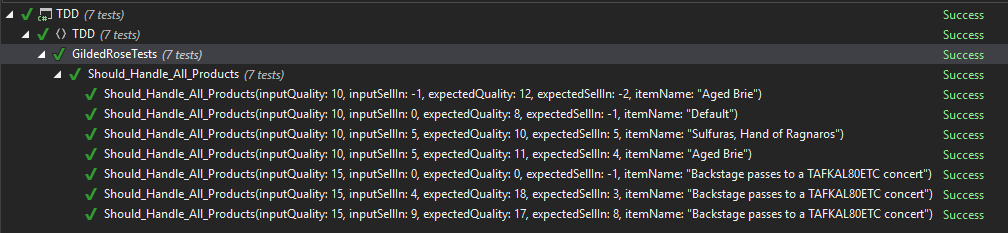
Before doing any refactoring, we should add unit tests to cover all the business cases. This is an example of unit tests (using XUnit & NFluent)
using System.Collections.Generic;
using System.Linq;
using NFluent;
using Xunit;

namespace TDD
{
    public class GildedRoseTests
    {
        private const string AgedBrie = "Aged Brie";
        private const string SulfurasHandOfRagnaros = "Sulfuras, Hand of Ragnaros";
        private const string BackstagePassesToATafkal80EtcConcert = "Backstage passes to a TAFKAL80ETC concert";
        private const string Default = "Default";

        [Theory]
        [InlineData(10, 5, 11, 4, AgedBrie)]
        [InlineData(10, -1, 12, -2, AgedBrie)]
        [InlineData(10, 5, 10, 5, SulfurasHandOfRagnaros)]
        [InlineData(15, 9, 17, 8, BackstagePassesToATafkal80EtcConcert)]
        [InlineData(15, 4, 18, 3, BackstagePassesToATafkal80EtcConcert)]
        [InlineData(15, 0, 0, -1, BackstagePassesToATafkal80EtcConcert)]
        [InlineData(10, 0, 8, -1, Default)]
        public void Should_Handle_All_Products(int inputQuality, int inputSellIn, int expectedQuality, int expectedSellIn, string itemName)
        {
            var input = new List<Item>
            {
                new Item
                {
                    Name = itemName,
                    Quality = inputQuality,
                    SellIn = inputSellIn
                }
            };

            var expected = new Item
            {
                Name = itemName,
                Quality = expectedQuality,
                SellIn = expectedSellIn
            };

            var target = new GildedRose(input);
            target.UpdateQuality();

            Check.That(input.First()).HasFieldsWithSameValues(expected);
        }
    }
}
Refactoring
Now we can start our refactoring since the method UpdateQuality() is 100% covered by unit tests. There are basically 2 steps for the refactoring. The first thing to to do is to make the code more readable (remove nested if, hardcoded Strings, create functions, remove duplicated codes, change names, use foreach,…). The second step(which is more important but depends on the fact we have the budget to do the refactoring) is to change the whole design of the method. For instance we can use inheritance with factories to handle the rule for each product type.
Make the code more readable
This is an example of how we could re-write the code with simple changes (without huge Refactoring) to make the code more readable (the code is still not clean but more readable than the previous one). The idea is to rename objects/methods, to introduce interface, to remove nested if, to introduce small functions,…
using System.Collections.Generic;

namespace TDD
{
    public interface IGildedRose
    {
        void UpdateTicketProperties(IList<Ticket> tickets);
    }

    public class GildedRose : IGildedRose
    {
        private const string BackstagePassesToATafkal80EtcConcert = "Backstage passes to a TAFKAL80ETC concert";
        private const string AgedBrie = "Aged Brie";
        private const string SulfurasHandOfRagnaros = "Sulfuras, Hand of Ragnaros";


        public void UpdateTicketProperties(IList<Ticket> tickets)
        {
            foreach (var ticket in tickets)
            {
                UpdateSingleTicketProperties(ticket);
            }
        }

        private void UpdateSingleTicketProperties(Ticket ticket)
        {
            UpdateQuality(ticket);

            UpdateSellIn(ticket);

            HandleExpiredTicket(ticket);
        }

        private bool IsSulfurasHandOfRagnarosTicket(Ticket ticket)
        {
            return ticket.Name == SulfurasHandOfRagnaros;
        }

        private bool IsAgedBrieTicket(Ticket ticket)
        {
            return ticket.Name == AgedBrie;
        }

        private bool IsBackstagePassesTicket(Ticket ticket)
        {
            return ticket.Name == BackstagePassesToATafkal80EtcConcert;
        }

        private bool IsTicketHasExpired(Ticket ticket)
        {
            return ticket.SellIn < 0;
        }

        private bool IsQualityHigherThanMinValue(Ticket ticket)
        {
            return ticket.Quality > 0;
        }

        private bool IsQualityLowerToMaxValue(Ticket ticket)
        {
            return ticket.Quality < 50;
        }

        private void UpdateQuality(Ticket ticket)
        {
            if (!IsAgedBrieTicket(ticket) && !IsBackstagePassesTicket(ticket))
            {
                if (!IsQualityHigherThanMinValue(ticket))
                {
                    return;
                }

                if (!IsSulfurasHandOfRagnarosTicket(ticket))
                {
                    ticket.Quality -= 1;
                }
                return;
            }

            if (!IsQualityLowerToMaxValue(ticket))
            {
                return;
            }

            ticket.Quality += 1;
            if (!IsBackstagePassesTicket(ticket))
            {
                return;
            }
            if (ticket.SellIn < 11)
            {
                if (IsQualityLowerToMaxValue(ticket))
                {
                    ticket.Quality += 1;
                }
            }

            if (ticket.SellIn >= 6)
            {
                return;
            }
            if (IsQualityLowerToMaxValue(ticket))
            {
                ticket.Quality += 1;
            }
        }

        private void UpdateSellIn(Ticket ticket)
        {
            if (IsSulfurasHandOfRagnarosTicket(ticket))
            {
                return;
            }
            ticket.SellIn -= 1;
        }


        private void HandleExpiredTicket(Ticket ticket)
        {
            if (!IsTicketHasExpired(ticket))
            {
                return;
            }

            if (IsAgedBrieTicket(ticket))
            {
                if (IsQualityLowerToMaxValue(ticket))
                {
                    ticket.Quality += 1;
                }

                return;
            }

            if (IsBackstagePassesTicket(ticket))
            {
                ticket.Quality -= ticket.Quality;
                return;
            }

            if (IsQualityHigherThanMinValue(ticket) == false)
            {
                return;
            }

            if (!IsSulfurasHandOfRagnarosTicket(ticket))
            {
                ticket.Quality -= 1;
            }
        }
    }
}
Make the design SOLID Friendly
The previous code is still not clean because if we want to implement a rule for a new Ticket we will have to change the method UpdateQuality(). The idea of the refactoring is to introduce inheritance/polymorphism and to handle « Ticket Properties Update » separately in different classes. There will be a class for each type of ticket. Here is an example of how we could refactor the code
public class GildedRose : IGildedRose
    {
        private readonly ITicketUpdateServiceFactory _ticketUpdateServiceFactory;

        public GildedRose(ITicketUpdateServiceFactory ticketUpdateServiceFactory)
        {
            _ticketUpdateServiceFactory = ticketUpdateServiceFactory;
        }

        public void UpdateTicketProperties(IList<Ticket> tickets)
        {
            foreach (var ticket in tickets)
            {
                UpdateSingleTicketProperties(ticket);
            }
        }

        private void UpdateSingleTicketProperties(Ticket ticket)
        {
            var ticketUpdateService = _ticketUpdateServiceFactory.Create(ticket.Name);
            ticketUpdateService.UpdateProperties(ticket);
        }

    }
The idea is to create a service for each type of ticket that implements its rule and use a factory to instantiate the service. We could use a simple factory or a container (Unity) to implement the ITicketUpdateServiceFactory.
With this design, if we want to add a new type of ticket we’ll just have a add a new service class.
We could also introduce inheritance/polymorphism inside of Tickets entities (instead of creating Service classes).
We will make sure our tests are still working after the Refactoring.
Conclusion
As a developer, it is important to know how to deal with Legacy Code (and when to do the Refactoring) because in almost every team there is Legacy Code. As far as I am concerned, using XP practices and Tests Driven Developments are a great way to avoid/manage Legacy Code.
There is a great book about Legacy Code (Working Effectively with Legacy Code) that I strongly believe developers should read.
 Le blog de Pape Singane